Finding the Right Sensory Cue for VR Navigation

Research question: Which sensory cue helps people find a target most effectively and efficiently in a virtual museum?

My role Lead researcher and experience designer

I led the study end to end: framing the question, building the VR environment and cue conditions, testing 71 participants, and analyzing behavioral and qualitative data.

Project context Controlled VR study, four cue conditions

A 71-participant mixed-methods, between-subjects experiment using behavioral measures, validated questionnaires, and qualitative responses. The design limited carryover and headset time.

Key result Active nonvisual guidance performed best; haptic led, with audio close behind

Audio and haptic reduced task-list checks. The mirror increased checks and completion time, while workload, presence, and sickness did not differ.

Method

01Build

Recreated part of the Louvre in Rhino and Unity, placed seven targets, and built the Meta Quest Pro interactions.

02Study design

Compared four guidance conditions in the same museum task using a between-subjects design.

03Data collection

Tested 71 participants with a consistent screening, practice, task, and survey protocol.

04Analysis

Combined task-list checks, completion time, validated questionnaires, and qualitative responses.

Study conditions

Four sensory guidance conditions were tested in the same museum task.

ControlNo guidance

A 90-degree forward view with no added cue.

MirrorRear-view mirror

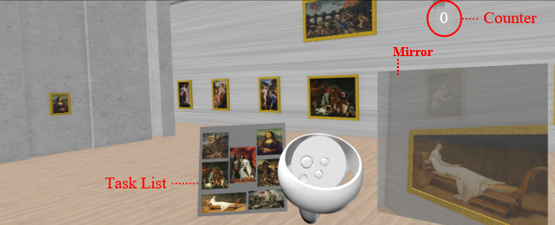
A rear-view display extended awareness behind the participant.

AudioProximity guidance

A beep activated within five meters of a target.
HapticProximity guidance

Controller vibration activated within five meters of a target.

Rear-view mirror guidance condition inside the virtual museum

Rear-view mirror condition shown inside the virtual museum.

Task Design

Five key steps including:
task, spatial environment, 3D modeling, equipment & interactions, and conditions.

Study Design

Four key steps including:
participant recruitment, setting, study introduction, practice session & task, survey.

task design

  • Task

    The task was an engaging scavenger hunt in a museum, where participants were asked to find seven specific paintings among the many on display.

  • spatial environment

    Google map, AutoCad, Rhinoceros 3D

    The virtual environment recreated a section of the Louvre Museum's Denon wing, featuring rooms 700–702 and 710–712 to ensure a balanced layout. Approximately 30% of the paintings were removed to maintain participant focus.

  • 3D modeling

    Rhinoceros 3D

    Rooms were modeled in Rhinoceros 3D, highlighting key architectural elements while omitting intricate details to avoid distracting participants.

  • Equipment, Interactions

    Unity

    The model was imported into Unity, where seven target paintings were placed across rooms. Participants used a Meta Quest Pro with a counter showing collected paintings and a task list to aid memory.

  • Conditions

    Unity

    Four sensory cue conditions were tested: 1)Control Condition: 90° front field of view, no cues, 2)Mirror Condition: Rear-view mirror extending vision behind participants, 3)Audio Condition: Beep sound within a 5-meter radius of targets, 4)Haptic Condition: Controller vibration within a 5-meter radius of targets. Each participant experienced only one condition, maintaining task consistency across groups.

study design

  • Participants

    Qualtrics

    The study included 71 university participants (30 female, 41 male), aged 18-35, screened for eligibility based on vision and motion sensitivity. Participants varied in gaming experience, with only two having prior, minimal familiarity with the Louvre.

  • Setting

    Experiments were conducted in a distraction-free lab space, where participants navigated the virtual environment seated, using controllers for movement and interaction.

  • Study Procedure

    Unity

    Participants reviewed the seven target paintings, completed a three-minute controller practice, and then entered the timed 20-minute museum task. The target list remained available in VR so the study measured navigation and cue effectiveness rather than memory.

  • Survey

    After completing the task, participants filled out a survey on task enjoyment, immersion, cue effectiveness, and willingness to try similar tasks, followed by the NASA-TLX, Presence Questionnaire, and Simulator Sickness Questionnaire.

Findings

01Active cues reduced search burden

Audio and haptic reduced task-list checks.

02More visual information was not better

The mirror increased checks and completion time, suggesting visual competition.

03Efficiency and experience aligned

Participants described audio and haptic cues as helpful and engaging.
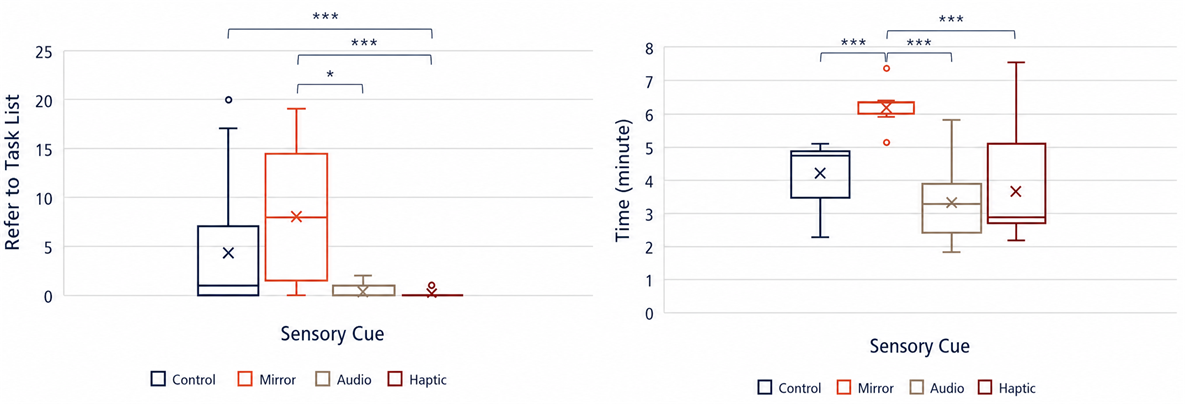
Box plots comparing completion time and task-list checks across four sensory guidance conditions

Box plots show the distributions of task-list checks and completion time across the four conditions.

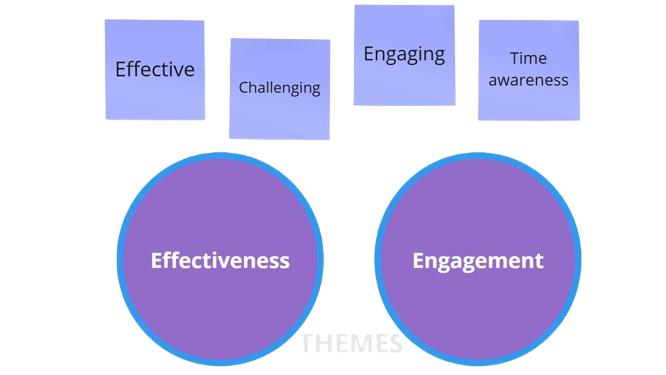
Feedback clustered around effectiveness and engagement, including challenge and time awareness.
Qualitative Findings and Analysis

Survey responses were grouped into four categories—effective, challenging, engaging, and time awareness—and distilled into two key themes: effectiveness and engagement.
Effectiveness: Participants in the audio and haptic conditions consistently praised the cues, noting they helped prevent missed paintings. In contrast, about half of those in the mirror condition rarely used the mirror, with only 6% relying on it frequently. Many participants in the control and mirror conditions described the task as challenging, while those in the audio and haptic conditions found it more manageable.
Engagement: Guidance cues boosted engagement across all groups. Enjoyment was highest in the audio (100%) and haptic (86%) conditions, where cues helped participants stay focused. Time perception varied, with most participants in the audio (76%) and control (70%) conditions experiencing a "loss of time," reflecting deep engagement in the task.

Qualitative themes of effectiveness, challenge, engagement, and time awareness across guidance conditions

Qualitative responses converged around effectiveness, challenge, engagement, and time awareness.

Lessons Learned

Use active nonvisual guidance before adding persistent visual information.

In demanding VR environments, active nonvisual guidance can direct attention without adding visual competition. Haptic led and audio followed closely, so the opportunity extends beyond one modality. Evaluating behavioral performance alongside participant feedback provided a fuller view of each cue. The best modality still depends on the task, environment, and accessibility needs.
What I would change next

Next, I would measure head movement, cue-response latency, and missed-target recovery; prototype alternative mirror placements; test adjustable cue intensity and accessibility preferences; and run a counterbalanced within-subject study to separate cue effects from individual differences and novelty.

Among all the things I learned during this project, one of the most transformative was honing my time management skills. I balanced a wide range of tasks—from 3D modeling to game interaction development, literature review, and pilot tests—while continuously adapting my workflow to meet shifting priorities.

Along the way, I gained valuable insights into working with human subjects, particularly in the intricate world of VR, where precision, attention to detail, and clear eligibility criteria are essential to ensure safety and reliable outcome. Perhaps the most challenging and rewarding lesson was cultivating patience and consistency; recruiting and testing 71 participants, with each session taking about an hour, was demanding. Remaining as attentive and consistent with each participant, from the first to the last, required endurance, as the study spanned two months of daily sessions. This journey not only strengthened my skills but also deepened my passion for innovative, human-centered design and research.

Continue exploring

Let’s Connect